ClustrMaps is a “must-have” widget for class and student blogs because it reminds students that they are part of a global voice and demonstrates how interconnected we all are.
So here’s how to set up a ClustrMaps on your blog using the ClustrMaps Widget.
The ClustrMaps widget is available to Edublogs supporters and Edublogs Campus only. On free Edublogs blogs you need to add ClustrMaps to your sidebar using a text widget!
About ClustrMaps
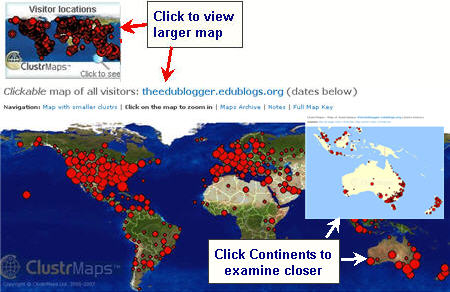
ClustrMaps is a free thumbnail hit counter map widget that shows the location of all visitors to your blog. Number of visitors from a location is indicated by the relative size of the dot.
Clicking the ClustrMaps thumbnail takes you to a large World map so you can examine your traffic sources more closely. To scrutinize even closer click on each continent on the map.
How To Add ClustrMaps To Your Blog Sidebar
The ClustrMaps Widget is contained in Widget Pack which you must first activate in your Plugins area.
- This widget pack also contains Delicious, Vod Pod, Twitter, Google Search and Flickr widgets.
- Once activated all these widgets will appear in your available widget area in your Appearance > Widget screen — ready for you to use.
- If your ClustrMaps disappears from your blog activating your Widget pack immediately returns your ClustrMap to your blog sidebar.
Adding your ClustrMaps is as simple as:
1. Go to Plugins > Installed in your blog dashboard.
2. Click on Activate below Widget pack.

3. Go to Appearance > Widgets in your Dashboard.
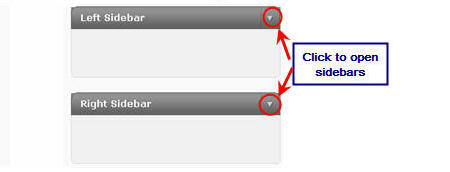
4. Click on the desired Sidebar to expand (so you can add the widgets)
- NOTE: In new blogs sidebars in your dashboard are empty and adding widgets automatically removes the default Edublogs widgets.
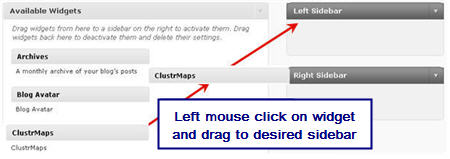
5. Add your ClustrMaps widget to the desired sidebar by dragging it from the Available Widgets area on the left into the Sidebar area on the right.
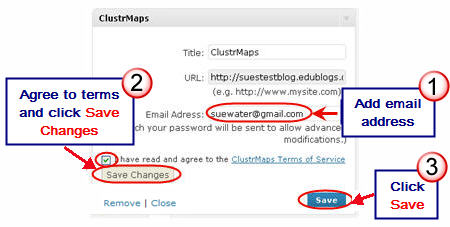
6. The widget will automatically open — add your email address, click on Agree to terms and conditions, and then click Save Changes.
7. Final step is Save and then Close.
- If you have trouble with the text widget or it doesn’t open — try changing your theme just in case there is an issue with your theme.
 8. You will receive an email advising of successful widget registration and your widget will look like this image in your sidebar — dots won’t appear for 24 hours.
FINAL THOUGHTS
Remember on free Edublogs blogs you need to add ClustrMaps to your sidebar using a text widget!
- Don’t forget to share your advice on “must-have” widgets for student and class blogs.
- Would love to hear your thoughts on Miss Wyatt’s Responsible use of avatars and widgets in terms of age restrictions.
If you are enjoying reading this blog, please consider  Subscribing For Free!
Is there any way that students would be able to get a discount (or get it free) for clustrmaps?
@miaru0809, Here are the instructions for your students to add ClustrMpas if they are using a free Edublogs – http://help.edublogs.org/2009/08/10/adding-clustrmaps-to-your-blog-sidebar-using-a-text-widget/
Do you need to be a supporter to add clustrMmap? I am a new user to edublog and I do not see ClustrMap on the widget menu.
I just tried to joint the Clustrmap service to see if there was a way but they did not accept my email address. I’ve fired off an email to their support team and am awaiting a reply.
No you don’t need to be a supporter to add a ClustrMaps it is just that you add using a different method. Here are the instructions for adding a clustrMap using a text widget.
I had a clustrmap but I wanted to add another widget, when I did my clustrmap dissapered and it isn’t on the menu anymore. I don’t know what happened!
You might have accidentally removed your text widget that contained the ClustrMaps when you added the new widget. If you give me your blog URL I can check for you.
I am a new, confused blogger. Are cluster maps really free? I see one place that says you have to be a ‘supporter’ to activate the widgets. So, what is the actual truth on this? Thanks!
Clustrmaps are free but if you want to install them using the widget you need to be an Edublogs supporter. Otherwise you need to go to Clustrmaps get their embed code and add it to a text widget.
Hi Sue
still not a supporter yet , but can you explain how to add Clustrmap as a text widget. Thanks for your help.
Hi Violet – you need to add the clustrmaps using a text widget. Here is the post that explains how to do this
@ka213 I had a test of your theme to see what it happening. I didn’t have the widgets going to the bottom left however when you add the clustrmaps it looks not so good because it is adding an extra colour box under the Clustrmaps.
Unfortunately the best solution would probably be to change to a different theme if you want to add a Clustrmap.
My blog is just 1 day old, so I am working out the kinks.
I just added a clustrmap, and when I did, my widgets mysteriously moved from my right sidebar to the bottom left, even though it still says its on the right sidebar in my ‘current widgets’ section. My theme is primivito, if that helps
@cspiezio Thanks for letting us know there was an issue with Clustrmaps. I contacted Clustrmaps, they isolated the problem and have now fixed it.
I just put the ClustrMap in my blog, but I’m a newbie! I’m a new teacher trying to use blogs with my 7th grade students! Does anyone have any advice for me!?
@Murcha I notice that Wes Fryer has been writing about this a lot lately and @Dr Mike is correct he has been talking about COPPA. But I haven’t really looked into it as the situation is different here as it is in every country. Might have to look back through his posts to read what he has been saying.
@Murcha, I believe you’re thinking about COPPA. The law doesn’t say that you as a site owner can not do it. It says you must have permission from parent or guardian to do so and have to state what you;re going to do with that information. (At least that’s how I understand it.)
In Sept I was fortunate enough to attend the Learn2.008 Conference. Whilst there, I learnt from some of the US participants, that the USA had introduced a law to protect children. This means that all children under the age of 13 cannot supply their email addresses to online sites.
I would assume that this information was correct. Does anyone else know?
No problem Taylor keep up the good work.
Thank you for that wonderful comment of yours!
Regarding the comment of @Ines/@Inpi about
>I can’t find the “Add” button
I notice that if a site ALREADY has the ClustrMaps widget, then neither the ‘Add’ nor the ‘Edit’ link appears next to the widget name! On the other hand if you click [SHOW] on the right hand side (Design… Widgets… Current widgets… Show) you should see it displayed there with an [Edit] link.
Hope that helps!
Thanks, Sue… great stuff as always… in fact we’ve linked our ‘ClustrMaps On EduBlogs’ instruction page directly to yours!
Link: http://clustrmaps.wordpress.com/html-setup/clustrmaps-on-edublogs/
Regarding ads etc: right now, it’s no problem… we will handle each site on a case-by-case basis, and there is no restriction regarding age of ClustrMaps users. IF there is ever any problem regarding inappropriate ads, then let us know immediately, and we will deal with it!
Thanks, everyone!
@Miss W Thanks for checking out the age limit and letting @Blogwalker (Gail) know ClustrMaps is considering options for removing ads on Edublogs.
Hi Gail,
Apparently they are looking into no ads for *.edublogs blogs or so they mentioned in their letter to me. They are chatting with James about it at the moment I think.
Sue, any chance the ClustrMap folks would consider “education-related” ads for Edublogger accounts?
Nowhere on the clustrmap website did they mention ages, so I wrote to them and they replied there is no age minimum so all students could use it. They are a bit worried though that some of the ads at the world map level might not always be family friendly. Apparently they are from AdSense in Google. Going to create a poll on my blog next week (once students are back at school) about who reads the ads with their clustrmap and will report results back to clustrmap team.
@Ines If your ClustrMaps has disappeared from your blog activating your Widget pack immediately returns your ClustrMap to your blog sidebar. You need to activate the Widget Pack in your Plugins area.
Thank you, Sue, for this very useful post.
I’ve been away, with troubles with my computer and new internet connection. 🙁
Now, this is my concern about clustr maps:
as I had misunderstood about this widget and thought my under 13 years students couldn’t have it in their blogs, I “cut it off ” from their widgets section.
Now they are back, but I can’t find the “Add” button that would enable me to embed them again.
Could you help me, please?
Ines