I’ve been asked a lot lately about ‘roles of users’ and what role should you assign student users on blogs.
Unfortunately there isn’t a simple answer because it’s a balance between:
- How much responsibility you’re comfortable with assigning your students
- School and District guidelines
- Providing them with an environment that’s motivating
So I’ve decided to explain the different user roles and I’m hoping others explain how they choose what roles they assign students.
Roles of Users
The five roles for users you can give students on class blogs or on their student blogs are: Administrator; Editor; Author; Contributor; and Subscriber.
The roles of users in decreasing level of responsibility are:
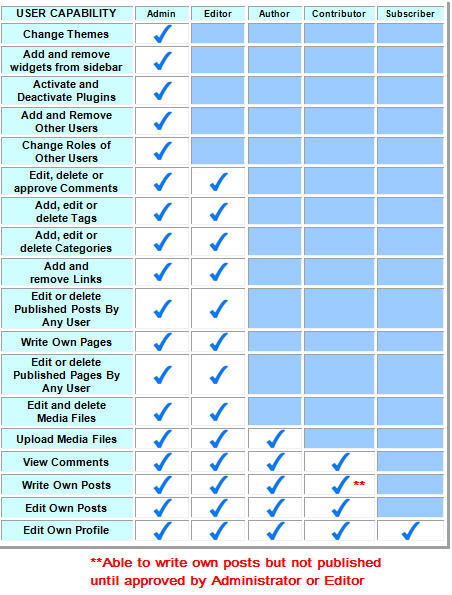
- Administrator: This is the highest level of blog access. An Administrator has full access to all blog functionality including changing themes, adding widgets, editing/deleting Posts/Pages, changing other user roles and deleting the blog.
- Editor: An editor has similar access as an Administrator but can’t change themes, add widgets or manage plugins
- Author: An Author can’t write pages but can write posts, upload media files to their posts and publish posts but can’t edit or approve other Author’s posts. Authors can view comments but can’t edit, delete or approve the comments.
- Contributor: When a contributor writes a post it is saved as a pending to await approval by an administrator or editor. They can’t upload media files to posts and like authors, contributors can view comments but can’t edit, delete or approve the comments.
- Subscriber: A subscriber is the lowest level of access on a blog. This role is normally assigned on private blogs where access is restricted to either logged in users or logged in registered users.
Here is a summary of their differences based on User Capability:
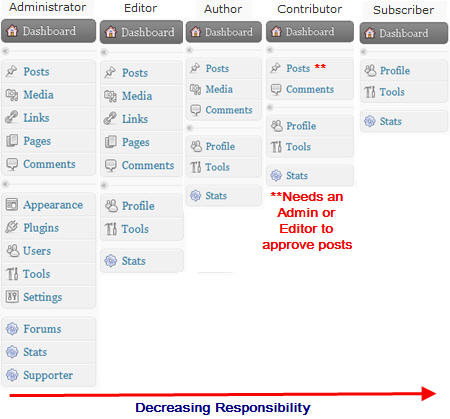
Here is a summary of their differences based on access to features in the dashboard:
For more information on working with usernames refer to:
Please note:
- The blog owner is automatically added as an adminstrator when new blogs are created
- When student blogs are created using the Blog & User Creator the student is the blog owners and they are added to the blog as administrators
- On an Edublogs Campus site there is an extra role of user; the Site Admin User.
- The Site Admin user has a higher level of access than an administrator; they can access all blogs across the entire Campus site in their entity without being added as a user to the blogs.
- Site Admin users can create large numbers of blogs and users, set privacy options for the entire site (and/or individual blogs), go into and edit any blog and monitor what any user is posting across the entire site.
FINAL THOUGHTS
So now we need your thoughts.
- Educators – What role(s) do you assign your students and why?
- Students – What role(s) do your teachers assign you on your blogs? What role do you think students should be assigned?
If you are enjoying reading this blog, please consider  Subscribing For Free!
I have set up my 130 students on our class blog. I am afraid that I have made a mistake in setting up their blogs. I batch created their accounts making myself the admin on their blogs and setting their roles as subscribers on their blogs and on the class blog. Now, they have not power to post to their own blogs. They may only post to the class blog (after I changed their roles to contributors on the class blog). How can I go back and make them editors/admins on their own blogs so that they can now post on their blogs. The class blog is getting very messy with student posts.
Just a quick note to say I’ve responded to this question via email.
@mecslibrary Hi Carole, can you email me at [email protected] with the blog URL that has problems and the username/password of a student that is having trouble as I need to log in as them to see what is happening.
Thanks Sue
Hi
I’m running two class blogs and all students are contributors. In one, the students are able to add images, but in the other blog the students don’t even see the Add image icon, and I have to change them all to author temporarily. The only differences I can see is the theme chosen, and one is not public yet.
Any explanation?
This is the blog that works OK- http://mecslib.globalstudent.org.au/
and my homepage is the one that doesn’t.
Carole
G’day Mr Miller and students,Thanks for jnoinig the March 2011 student blogging challenge. So you can contact other students and look at their blogs, make sure you keep referring to .If you want to connect with other classes, then check out .Also each week starting in March, check out the student challenge blog for the different activities to do – look at ‘Latest challenge posts’ under the map on the right sidebar.
Hello. I have an interesting situation. I teach in an alt. ed. school for girls. Internet access is pretty restricted; students can’t have access to email or social networking sites and there are alot of other web pages blocked. I did get permission to use a blog. I created generic student id names using my gmail address and assigned contributor status to each. However, when I tested what this allowed them to do AND see I was dismayed to find out that the gmail address assigned to that student id name is visible in the profile page. That is a no-no as far as admin goes. I understand that if they try to use it I will get the responses back. Is there any way to block students from seeing the profile page?
@landrews, I’m sorry but maybe I’m misinterpreting what you are saying so please feel free to clarify if I have or if any of the other teachers here want to share their thoughts — I would like to hear it.
But you are using fake student IDs so that you have created their student IDs and doesn’t link to real, identifying information supplied by the school. Plus you have use the gmail+ method where the emails are being sent to the one gmail account (for example, [email protected], [email protected])
How can that be an issue for admin? The emails aren’t going to the students and the student aren’t identifiable. Please correct me if I have that information wrong.
I may be wrong — and I’m happy for other teachers to convince me of reasons why we would hid the profile page – but at this point in time I can’t see any reason for hiding profile pages because it is important for password changes etc.
As a follow up to my initial comment, I want to thank Sue and the above comment authors for suggesting the RSS feed, which I have been using with great success. I even now let my students have “Protected” conversations for more private interactions. These do show up as “protected” on the feed, but I can see them easily by going into the dashboard of the student and looking at Recent Comments.
Our class blog has grown exponentially this year and I’m extremely satisfied with the way Edublogs/Wordpress is set up to allow so much manipulation of user roles. It took some amount of time to get comfortable with the entire interface, but as I tell my luddite-inclined friends – you have to be willing to get messy with technology at first. There is no substitute for experience.
@MisterB, I’m really glad that you have discovered that the RSS feed really does help you manage it better.
Your Campus site really is coming along well and you should be really proud.
I think this statement ‘luddite-inclined friends – you have to be willing to get messy with technology at first’ is so totally true. Take a chance. Be forgiving on yourself by accepting you won’t always get it right and be willing to make the occasional mistake. Nothing was ever invented right the first time — what was it? 1000 different ways until they got the Dyson vaccum cleaner right?
BTW one of the blogs on the class blog list is interesting and might be a good concept for you to consider. They have set up a team blog of 12 students who are responsible for being the media people for the school and report on all the cool stuff that is happening. I really like that concept!
@Sue Waters, Thanks for the kind comments Sue. I like the idea of the 12 member team as well. I will check it out.
Best, Robert
Hello everyone,I was contncnieg to my classroom blog when I happened upon your classroom blog. I really want to set up blogs for my students next year. Your blog is very inspirational. I teach in PEI, Canada. I would love to visit Australia some day. Perhaps my students in the fall could blog with your students. Thank you for all the wonderful ideas.LeslieFrom Mrs C: Hi Leslie, we’d be happy to blog with you in our spring and your autumn, as we call it. Thanks for visiting, and please let us know when your class blog is up and running.
how come my catigories arit showing up on my blog?
@homeworkman223, Can you give me your blog URL so I can check it for you?
I just set the blog up for my 4th graders. They are all quthors. The intent is for them to ‘ditch’ their homework journals and post HM to the blog so I can keep up with it and display it in the Smartboard in class discussions. The parents recive the login info so they too can c what is going on. I plan to have twoguest editors,but that will probably not happen until next school year until I get really good at blogging and keeping uo with things! Thank u for te guide. Ill let everyone know how it goes. And yes the blog will b a grade. The 4 students I have without internet will continue to use their HW JOURNAL.
That is quite the decision, to what kind of level of responsibility do you give your students. I think that it probably goes hand in hand with the amount of trust you have in your students. I am in a totally different scenario. My school blocks all blogging, period. I am in Walden University’s: Intergrating Technology in the Classroom program and am wondering is there a way that I can convince my district to end this policy. I know my students are very skilled at blogging at home and can see the learning opportunities of blogging. But am stuck with a district that is against this opportunity. Any suggestions would be greatly appreciated.
Craig Dellemann
Reedsville, WI
@Craig, that is a really hard one. I know some have written blogs posts and got edubloggers around the World to explain the benefits of blogging which have then been used to successfully allow blogging.
Is it a District policy or school policy? Would it help if we gave you links of good examples to show them?
For Kindergarten to 5th grade, either contributor
or subscriber, depending on if you want them to post or not.
6th-8th: Editor/Author
9th or later: Admin
7th or later admin.
5th-6th editor/author
5th: anywhere between contributor and editor
I have just tonight finished setting up 25 Grade 5 students. They are all contributors and I am the administrator. All comments and posts will go through me. This will continue until I am sure the students have learned about web safety and etiquette. Then, I will increase their access to author, and eventually to editor. Being somewhat of a curmudgeon, I will retain absolute control as sole administrator. (bwaaa haaa haaaaaa haaa argggghhh…..)
@mrsmuin,
That is fantastic. From experience, once the students get their own individual blog, suddenly the class blog becomes less useful. But check out some of the class blogs taking part in the student blogging challenge especially the Eagles Nest, Ms Cahusac in Hong Kong.
http://wyatt67.edublogs.org/student-blogging-challenge/september-participants/
Have you investigated the merits of removing moderation? Kids do dumb things sometimes, but I can’t help but wonder if there aren’t a few teachable moments being lost because the students are pre-censoring themselves. Knowing that it’s being seen by a teacher should (theoretically, I realize 🙂 keep them honest…
@Renee, personally I prefer not to moderate and as you say use those moments as teachable moments.
By taking that approach you do spend a lot of time discussing appropriateness so that when they are interacting online at home they are remembering the need to be appropriate.
@MisterB, your best option is to do as Miss W and Mrs. Ilgunas.recommend. Changing their user roles want make the process easier and if any thing will make it more time consuming for you.
I would set up Google Reader and having all the posts and comments feeding into it. Allow the students to approve the posts knowing that you can quickly see any issue and edit if necessary.
Here are the instructions for setting it up.
Thanks Miss W and Mrs. Ilgunas.giving MisterB your advice and that is so cool @Mrs. Ilgunas that you students are busy thinking about their taglines.
Like Mr.B, I give my 7th & 8th grade students administrator access, with me as co-administrator. They love being able to choose their theme and decide on the name of their blog. Today, I had two girls furiously writing down quotations so that they could change their tagline every couple of weeks. This did not come from me, they found they couldn’t decide on a quotation for a tagline, and this is their solution (how wonderful is that?). So far (knock on wood) I have not had any major problems with students as administrators. MrB, the only thing I can give you regarding the comments & posts is that I put all their blogs into Google Reader, then take a quick look every week to see what’s going on. Sorry, I haven’t found an easy answer to your question.
Thanks for that Sue.
I have 38 students.
I initially have allowed all of them to be admins of their own blog with me as co-admin. I did this so:
1. each student could choose a theme.
2. each student could change their title.
3. each student could change their own password.
Now that many of the students have set their blogs up, I am running into a management issue.
The comments and posts that I see in my admin panel are only those that are being made to the main class blog.
I want a *quick* way to see the most recent comments/posts of all of my student blogs on one page. I’m wondering if there is a way to RSS the entire site so I see ALL recent comments and posts collected into one space. Otherwise, I am laboriously clicking on each student’s blog to see their most recent activity.
If I add RECENT COMMENTS to the main class blog, it only registers comments made ON the main blog class blog, but I don’t know if students have made changes to their own blogs.
I have thought about reducing the role of my student users from admin now that they have their blogs set up.
Question: If I now reduce their role to author, say, with me remaining as the only admin for their blog, does that mean their activity will default to my main Admin Panel and that would solve the problem?
Thanks for any and all help on this!
@MisterB, I have two folders in my Google reader – one for the RSS feed from each student blog in grade 6/7 and one for the comment RSS feed from each student in grade 6/7. I also have the same for grade 8 and grade 9/10. This means if every student made a post on the same day I could have 200+ posts to read and the same with comments.
Now with the student blogging challenge as well I have over 1000 feeds into the reader.
But as not every student writes a post every day, I find that checking once a week, usually the weekend gives me plenty of time to read the blogs and comments from my class student blogs.
The blogging challenge though I check daily.
@Miss W., that is totally wild! I’m excited by the concept, but overwhelmed by the number of feeds to go through…as far as brain based…I’m abstract random, continually struggling for order in my world.
I’m also curious, how am I to decide who gets the lesser responsibilities within your recommended hierarchy? Right now, I’m using a wiki I learned to make in a master’s class over the summer, and now want the kids to take ownership and provide a resource for themselves, getting extra points and making learning a process. For now, I’m letting them become members by approving, and letting them add and edit, to increase the amount of material available on the wiki. Should I assign that kind of infrastructure to it if it’s independent of my regular curriculum?
@[email protected],
With my student blogs, each student is an administrator of their own blog. That means they have as much control as I do. They can change themes, add users, edit, write posts and comments.
I am there as a backup rather than the person who does the moderating. In the two years of using the first 30 blogs I have only had two students ask me whether they should approve a certain comment. I checked it out for them and said, ‘Go ahead, that is OK’ but I have then used that as a teaching moment in the class. I have shown the students how to go to the URL of the commenter to check out if the website or blog is reasonable to have linked to their blog.
Before my students got their blog, they have done about four weeks learning about how to be internet savvy and have had to earn the right to have a blog.
With regard to your final question, it depends upon how well you have taught the students internet safety first, whether you trust them to do the right thing and come to you if they need help and finally whether you are prepared to put in that amount of time outside your curriculum area.