Email subscription is a ‘must have’ widget on blogs.
Why? Because visiting blog to check for new content is time consuming.
Most people read the latest posts from their favorite blogs by subscribing using RSS or email subscription.
Email is extremely important for:
- Readers who prefer to receive latest posts using email subscription
- Private blogs — these don’t have RSS feed because only logged in users or logged in registered users are allowed to view the content
Email options
There are three main options for adding email subscription to your blog:
- Feedburner email subscription – all blog users except private blogs
- Email Subscription Widget – Edublogs supporters only
- Subscribe2 email subscription- Edublogs Campus only
Feedburner email subscription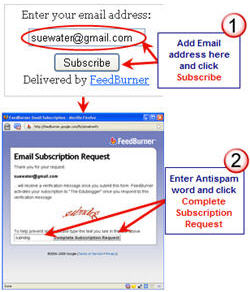
Feedburner is one of the most common free services used by both bloggers and podcasters to manage their RSS feeds.
It’s popular because it provides bloggers with the ability to easily analyze their subscribers in terms of:
- how many subscribe by RSS
- which feed readers they use
- how many subscribe by email.
Your email subscribers are sent an email of your full post that day after it is posted.
Setting up a Feedburner email subscription is as simple as:
- Step 1: Creating a Feedburner RSS Feed For Your Blog
- Step 2: Adding the Feedburner Email Subscription to Your Blog
- Step 3: Redirecting all your feed through Feedburner
Email Subscription Widget
The email subscription widget is the fastest and easiest way of adding email subscription to your blog. It sends an email immediately when the post is published.
Readers click on the link in the email which takes them to the post on your blog.
Just go to Appearance > Widgets and drag the email subscription widget into the desired sidebar.

Subscribe2 Email Subscription
Subscribe2 is the most sophisticated email option with lots of management choices for both readers and the blog owner.
Email notifications can be either:
- Latest posts
- Daily or weekly digest of posts
- Plain Text – Excerpt; Plain Text – Full Post or HTML – Full Post
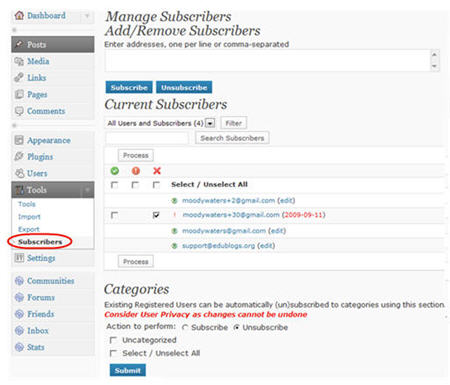
Bloggers can monitor their email subscriber; easily adding and removing subscribers inside their blog dashboard.
Subscribe 2 also provides the ability to send out emails to all confirmed subscribers; for those occasions when you want to send an email but not write a post.
Setting up a Subscribe email subscription is as simple as:
If you are enjoying reading this blog, please consider  Subscribing For Free!
nice widget
even i have designed a new subscribe by email widget
http://www.designrapid.com/subscribe-by-email-wordpress-blogger/
Is there a possibility of getting the Weekly Digest functionality to work with the current Subscribe feature? I know that it was a challenge to implement back in 2009. For our institutional use, we are really limited to a weekly email. Sending a blanket for each post is not acceptable to the readers or the administration. Sending a weekly notice is, on the other hand, highly desirable.
Hi Thomas, we don’t have this with our current Subscribe by email tool however we’ve had several of our users request this type of feature. So I’ve followed it up with our technical team. They’ve agreed to create this type of functionality but it will take some time to develop.
Thanks so much! I realize that it will take some work, but we will really get a lot of value out of it.
@Jackie Ross Apologies for delayed response but I’ve been very sick with the flu for the past 11 days.
Can you tell me what blog platform your blog is hosted on? Or give me your blog URL? Each platform has it’s own restrictions on embed code.
Hello Sue,
I was wondering if you could help me. I am trying to set up the rss feed and the email subscription. I can’t get them to work and have followed all of your directions. ugh!
I can get the email subscription on the page but I can’t make it work. I also have an RSS feed in the corner but not the one I think I am suppose to have.
Let me know if you can help me.
Thanks,
Jackie
Hi Sue,
I’m brand new to blogging! I teach technology for students in Young 5’s through 5th grade. My 5th graders are allowed to create their own posts which generate multiple posts per class period.
I am trying to set up a Subscribe 2 widget and would like to adjust the “Send Emails” to Weekly, but I don’t see this option on my dashboard. I feel a little silly asking, but I thought I’d try anyway.
Thanks for any help you can offer!
Kelly
@Techie Kids, Hi Kelly, definitely not silly for asking.
But we had to remove the Weekly option from Subscribe2 as there was issues with it. Subscribe2 was developed by another company and we’ve had troubles with getting it to work how we would like on Campus site. Unfortunately it was triggering mass emails of the same digest to the same email addresses 🙁
After spending lots of development hours trying to solve the issues with how Subscribe2 was working we’ve now developed our own custom email solution, as we decided it was the better option, and that should be installed on your Campus site in the next 2 weeks or so.
There is a lot involved in designing email solutions so for now the only option will be email notification of a new post. When it is install it will automatically transfer all your subscribers from your Subscribe2 email list into your new email system.
But that hasn’t solved your problem re-number of posts they write 🙁
@Sue Waters, Thanks so much for your response! I just wanted to make sure I wasn’t missing the option somewhere. I will look for the new email system change. I really appreciate your help and all of your hard work on this site! I am constantly reading The Edublogger! 🙂
Have a great day!
Sue-
I read in another person’s comment that they had a hard time getting Feedburner attached to their blog. I am also having a hard time. I am not a supporter and would like to use Feedburner. I have triple checked my setting and don’t think that I have any privacy settings activated. Following your directions, I went to Feedburner. I got an error message- “An error occurred connecting to the URL: Error getting URL: 404 – Not Found.” I rechecked my URL. What should I do?
@coralugo, you would only have problems with privacy if you were an Edublogs supporter and had made the blog entirely private. You shouldn’t be having trouble. When you are adding your blog URL are you adding it n this format http://theedublogger.edublogs.org/?
@Sue Waters,
This is the blog URL which I entered; http://lugosclass.edublogs.org/
I am still having no success.
@SueWaters,
I got it! I was entering the wrong URL. Thanks for your help!!!
Hi Ms. Waters!
Thank you very much! Also thanks for mentioning my blog on your twitter!!!! I wondered where all the new visits on my blog from September 23rd came from (when I woke up I was pleasantly surprised at the new comments and new visitors on my flag counter!)……. It was my pleasure to write that post, and I have never entered a “theedublogger” competition (I did only start blogging last March though and for a while did not know about these competitions) before and I am certainly glad I did! It is/was very fun.
Miss Wyatt’s Challenge (I assume that when you said “challenge” in your comment you meant this) is going well for me. I have written the post for the first week and updated my “About Me” page. I have been busy and have not had that much time to work on Week 2’s posts but I will try to. I have done some of the activities for Week 2 though, for example: I visited 5 blogs on the Participants List and I left comments.
Email subscription seems really helpful……now I will have to ponder whether to put that on my blog!
Sincerely,
-Dominique
@Dominique, pleased to hear you loved the dots and new visitors. While they might not have left a lot of comments but they twittered quite a bit about. As I said great advice for educators.
Yes I checked out your About page and it was looking really good. The key is to pick and choose the tasks you want to do but most important Enjoy! Don’t worry too much if you don’t finish all task but make sure that you have fun.
Keep up your excellent work!
This post is extremely helpful and clearly written. It deserves a gold star in my Reader like so many of your other posts. Thanks.
@Paul C, Thanks Paul as always for your excellent support. I’m glad the post was useful. Email subscription is really important. You would be surprised by the number of email subscribers I have.