 Looking for a blogging app for your iPod touch and iphone? Maybe not yet, but we’ve had quite a few people asking what to use.
UPDATE (10 Aug):
- Both BlogPress and WordPress for iPhone now work on Edublogs blogs
- You need to be an Edublogs supporter or have ads disable on your blog (by an Edublogs supporter blog) to be able to use these applications with your Edublogs blogs
Thankfully Mr B. from Teach Me Tekkie blog saved research time by telling me how he has been using BlogPress to post from his iPhone.
All you need to do is:
- Install BlogPress from your App Store of your iPod touch or iphone
- Launch BlogPress and add your blog details
NOTE: Edublogs users need to select WordPress as your blog Service Provider)
- Click on the Write tab to start writing your post.
- With BlogPress you can write text, add one or more photos from your iPhone, edit the images and add categories and tags to your posts before uploading.
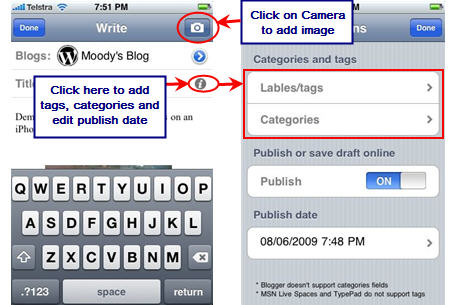
- To post just click on Save and then Send Now!
WARNING:
If you haven’t adjusted the timezone on your blog dashboard to your current timezone when you upload your post it may be uploaded as scheduled to post and won’t publish until the scheduled date/time.
Change your timezone inside your blog dashboard by clicking on Settings > General and scrolling down page to timezone.

FINAL THOUGHTS
Always looking for new apps to use on my iPhone (as is many of us). Please leave a comment to tell us about your favorite apps and why you to like these applications.
If you are enjoying reading this blog, please consider  Subscribing For Free!
well, since this post came up when looking for the source of the problem…I figure I’ll post here with the solution.
If you get the “failed to connect, check password or network” error for your site, make sure the xmlrpc ability of that site is enabled. For instance, in WordPress, you need to go into settings/Writing and check off:
[ ] XML-RPC XML-RPC Enable the WordPress, Movable Type, MetaWeblog and Blogger XML-RPC publishing protocols.
The app should have better debugging and at least give you more info on the error I’d hope. Still a great all-in-one app though.
i
hi……….
i love this very much
I’m getting that Unable to Connect message when I try to connect my WordPress Blog. Is that an issue of Blogress that is being addressed, or is there some other way to make the app work?
@Eric you may need to go to Settings > Writing and enable XML-RPC. If that doesn’t work you’ll need to check on the WordPress.com support site to see if there is anything else you need to do.
My blog will not post at the scheduled time. When that time occurs, it says missed scheduled post. I checked my time settings and they are correct. Any ideas? Thanks!
This blog is really nicely done. Thanks for all these useful information.
Very nice guide, thnaks for htis.
Hi Christine, to check it I will need your blog URL.
@Sue Waters, Hi sue, thanks for you help. i replied in the email but will do so here as well. probably blog etiquette to reply to the comment on the blog page!!
http://annabeldalzell.edublogs.org/
@Christine, technically there is no correct answer to where to respond.
If it is their blog then you know they will get the response because they get an email when comment is left. However if it was a reader leaving a comment on your blog then you might want to email then the response as there is no guarantee the will get it otherwise.
Your problem is fixed. All you needed to do was add a widge to that sidebar and it removes all the default widgets.
Hi sue, not sure what is the best way to ask this question. I thought i would be able to start a new thread on the “forums” page, but cant find where to do that?
So… We have just started a class blog, We can not remove the catergories widget.Have cleaned out the cache folder. The widget is shown in our widget page as “removed but on the site page it is still showing?” We are using internet 6 and are just using the free service at this stage. How do i proceed?
regards
Christine Rounsevell
Urrbrae high school
Yes. Just finished the article, purchased the app and continue to get a “failed” message every time. Any assistance would be appreciated. Not anticipating the app store to refund my $2.99.
@jdenno, Unfortunately as I commented above it is either an issue with BlogPress or related to we have had to temporary turn off “/xmlrpc.php” for security and stability reasons. I’m wondering is it is “/xmlrpc.php” so it has only just been switched off and I’ve just started receiving feedback of issues. If is it the “/xmlrpc.php” it should be switched back on in the next few weeks.
I was only realised the issue yesterday – I will edit the post for now to say at present it isn’t working for Edublogs blogs.
I did as instructed… and every time I try to log in I get the message “Failed! Failed to connect the blog service provider, check your password and network connection.” I’ve doubled checked my login info every time. I’ve tried it over WiFi and on 3G. Get the same message every time.
Any suggestions?
@Ms. Bonus, Are you using BlogPress and trying to do it with an Edublogs blog or another type of blog?
@Sue Waters, I have an edublogs.org
cindybonus.edublogs.org
@Ms. Bonus, thanks for confirming. Yes I just tried to add another of my blogs to BlogPress and am now getting an error too. It is either an error with BlogPress or related to we have had to temporary turn off “/xmlrpc.php” for security and stability reasons. It should be switched back on in the next few weeks.
Thanks for the informations und greetings from G E R M A N Y !!
Thanks for your help! Just learning how to blog.
Thanks for the tutorial on how to blog on the iphone. Your blogs are so helpful. Just started blogging.
A little side note on the ‘Stubby Fingers and typing on iPhone problem’.
Wait till you get a hold of iphone 3.0 Software. Been using it about 4 days now and copy/paste removes chore of html tying for posts and landscape email/text keyboard solves big fingers problem.
Mr B
I believe based on my research that “iPhone OS 3.0 software will be available on 18 June as a free software update via iTunes 8.2 or later for all iPhone customers” for Australia. But I could be wrong? Looks like I have to wait a few days 🙁
One of the best ways to use this technology is for instant uploading and display of pupil work. I have demo’d pupils working on task then uploading a photo of their work- it really engages.
Good point Frank, you can take a quick photo on your iphone. Write some short notes and near instantly the information is on your blog.
Hi, I also read your post and having an ipod touch I got right on to it. Yes the stubby fingers was an issue but like you say for a quick post and just to experiement it was fine. I particularly like the way the ipod substituted my wrong words for the correct ones which made typing quicker.
However I came to posting to wordpress and the ipod told me it was successful but when it came to viewing the page it said it wasn’t found error 404. I had no problem posting to blogspot.
So I am at a loss at to what I have done wrong with the wordpress entry.
Hi Pam, you have been caught out by the same thing I was caught out with. See the bottom of my post where I say warning. I bet you that the time in your blog dashboard is not your timezone. What has happened is it has scheduled your post to be published.
What you need to do is change your time zone inside your blog dashboard or change the publish date to the previous day when you upload from BlogPress = really annoying!
Very nice guide, however couldn’t you just go to http://www.edublogs.org to blog on your iphone or ipod touch?
You could but the interface isn’t any where as good or as easy to use compared to using these apps designed to work on iphones.
Excellent article, as always. The only down side to this ‘blog from mobile’ is the short stubby fingers trying to accurately type on the small fiddly iPod virtual-keypad.
I have started a few blog posts in this way before but I feel much happier finishing them off when I’m sat in front of my PC and I can check links, spelling, tags, categorise, etc at peace and in no rush.
Hi David, yes I have to agree. I like to write my posts on my computer for exactly that reason but that is because they are detailed posts and often time consuming to write.
However we are getting quite a few educators and students now using these devices who are looking for fast solutions to writing quick posts.