Whether you are a fan of Facebook or NOT really doesn’t matter.
What does is most people have Facebook accounts. Reading updates and commenting in Facebook is what they are used to whereas posts on blogs isn’t.
Importing your blog feed into Facebook means that people who are most comfortable using only Facebook are more likely to read your blog posts.
Here is how you import blog feed into Facebook:
1. Log into your Facebook Account and click on Profile

2. The next step depends on if you have or haven’t written a Note before.
If you haven’t written any Notes:
i) Click on ‘+” tab and select ‘Notes’
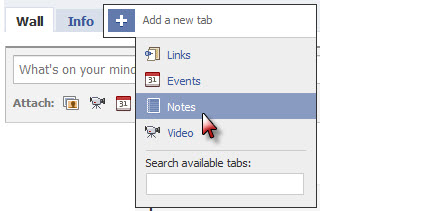
ii) Click on Write a new note
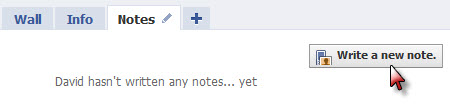
iii) If you don’t see the option to Import a blog just quickly write and add a short note (on anything) and click Publish.
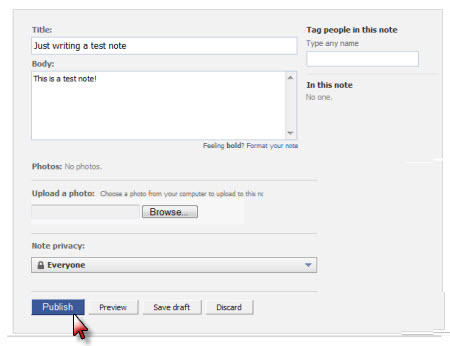
iv) Now click on My Notes

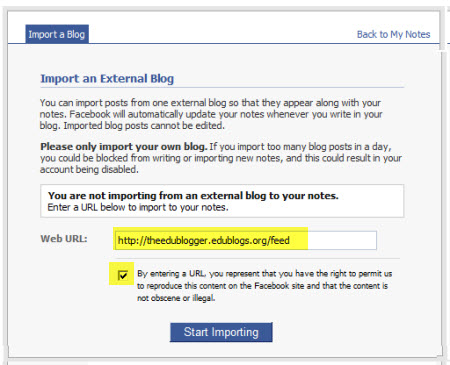
v) Click on Import a blog
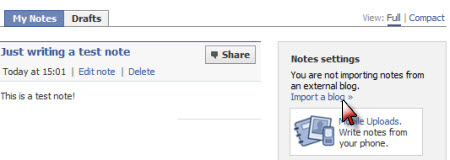
vi) Add your Feed URL, agree to their conditions to import feed and then click Start Importing
- For Edublogs blogs – your Feed URL is your blog URL with feed at the end e.g. https://www.theedublogger.com/feed
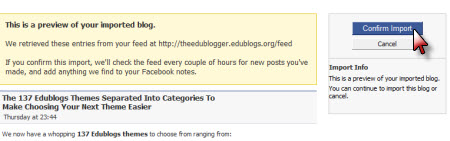
vii) On the preview of your imported blog page click Confirm Import if you are happy with the Preview.
b) If you have written Notes previously
i) Click on your Notes tab

ii) Click on the title of one of your notes

iii) Now click on My Notes
v) Click on Import a blog
vi) Add your Feed URL, agree to their conditions to import feed and then click Start Importing
- For Edublogs blogs – your Feed URL is your blog URL with feed at the end e.g. https://www.theedublogger.com/feed
vii) On the preview of your imported blog page click Confirm Import if you are happy with the Preview.
How Importing Your Blog Feed Works
Facebook regularly checks your feed every few hours and automatically adds any new blog posts to your Facebook notes.
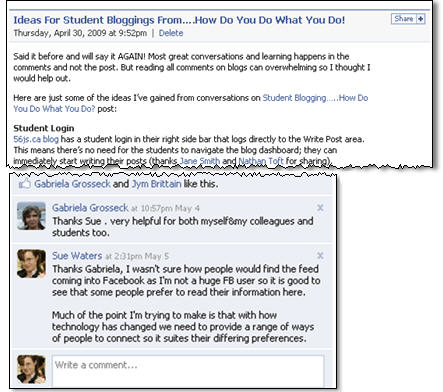
Readers who are prefer Facebook can now read your posts directly in their Facebook account and comment directly on them within Facebook.
Any comments left on your post in Facebook will automatically be sent to your email account associated with Facebook.
You just click on the link in the comment notification email to log into your Facebook account and respond just as you would for a comment on a blog.
Importing Multiple Blog Feeds
You are only allowed to import one blog feed using this method.
Options to import multiple blogs feeds into your Facebook account include:
- Create a consolidated feed then import that feed instead using a tool like Yahoo Pipes
- Use a Facebook App like NetworkedBlogs, RSS Graffiti or Blog RSS Feed Reader
FINAL THOUGHTS
For those new to Facebook you might like to check out:
- Larry Ferlazzo’s A Beginning List Of The Best Resources For Learning About Facebook
- The Elluminate recording to Pimp My Facebook
Please leave a comment to share your advice to educators new to Facebook such as:
- What are your views on allowing students and parents to connect with you on Facebook? How do you handle this type of situation?
- What features should people new to Facebook learn more about? Can you recommend any Facebook
“How-tos” for them to check out? - What other aspects of Facebook do they need to consider when using it?
If you are enjoying reading this blog, please consider  Subscribing For Free!
@pinky unfortunately Facebook can be really temperamental with RSS feeds. Try using the Networked blogs application that normally works but is a bit harder to set up.
Right I followed the last comment suggestion from you for Joanna and my blog is not posting to my notes. But how do it get it to post directly to facebook wall?
I am still having trouble linking my blog to facebook., It keeps telling me they can’t find a feed url, I haven’t a clue about these things so any help would be much appreciated. I followed all the steps above but still refuses to post for me.
@Joanna The feed URL for a blogger blog is different from Edublogs. Did you try using http://joannahendrie.blogspot.com/feeds/posts/full as that is your RSS feed for posts.
Thank you in advance for your clear instructions re: feeding one’s blog to facebook. I have a question – I have followed your instructions and Facebook says does not allow my feed (url). Now, let me go back I had not posted for awhile and then posted this week – there was a feed, then a no feed – so I deleted the feed and started all over. Big mistake, becasue that’s when I got the error message. I have been all over Facebook and cannot figure out what to do
Thanks for the help,
Joanna
hi thanks for the tips!
but just to verify with you by doing this
does it mean that my blog’s traffic will reduce because everyone will be reading my blog entries through the Notes application
is there anyway i can post blog entries on facebook but when my friends click on it, it will direct them to my original blog website?
thanks!
@lifang The reality is the majority of your readers will be subscribers who read via RSS or email. Visits to your site are always a lot less than that number. If anything it is opening up your blog to entirely new and difference audience. Where you will be interacting with them in Facebook as opposed to directly on your blog. No it doesn’t look like it however you could add a link at the bottom of your posts like I do to get people to subscribe.
This is great! Thanks for all of your wonderful advice, Sue. Many of my coworkers are on FB, but I have had a much harder time getting them to subscribe to a blog reader. This way I know they will see my posts 🙂
@garrettlibrary, Good to hear my tip is helpful. You will be able to see if it is working by clicking on Notes in Your Profile inside Facebook. I find some people like responding to me directly by leaving comments under these posts in Facebook.
But I should warn you (chuckling) I have had a work colleague say couldn’t you just once post an update on something cool 🙂 So I wrote an update while looking after a friends class in the computer room about not being well and hoping my afternoon students would look after me. Not realising that while I didn’t know her students one of them had added me as a friend on FB and wrote an immediate response back 🙂
Well…for better or worse I have followed your excellent instructions on how to do this. Thanks for letting me know that it was even an option. My blog is aimed mainly at parents and I have recommended that my students access the class blog through the traditional channel. Hopefully my parents will find it useful. I was a bit surprised to find that my new post was published as my status though! – shows how little I understand the notes application in Facebook I guess 🙂 Wonder what my friends will make of it?
Yes your new posts are published in your status. I should have thought to warn you. Sure some of my work colleagues have commented on that but for me my Facebook account is for my professional work. If they don’t like it they can always remove me from their account.
This sounds really great, however I use my Facebook to keep in touch with friends and family spread around the country. They don’t want to read about my class blog and I don’t want my students inducted into my life on that level. In fact, it is frowned upon for ethical reasons in my district.
Yes and I agree. In my other post on Facebook I do touch on issues with using Facebook. I personally wouldn’t recommend any teacher who deals with children add them to their Facebook account.
My Facebook account is mostly for work and connecting with others. My students are adult students and for me it has been an important way of providing them fast, effective support that is convenient for them.
Awesome tips! Thanks for the helpful info on how to do this. And the images were great too, for those of us who have a hard time finding where to click, lol.
Keep up the free and great tutorials.
Have fun,
Blazing Hot Concepts
Great tip…thanks so much for sharing! I have added my blog thanks to your easy step by step directions. 🙂
Glad the directions helped and please let me know how your Facebook friends find reading your posts in Facebook.
Hi, Sue.
Thanks for the great post. A question for you: Have you tried combining multiple feeds inside feedburner, then using the new feed to import into Facebook? Just wondering.
Hi Michael, I feel like you have dared me here (not that you have but it was like a personal dare — with myself and Sue could you do it).
And off course I hadn’t thought of doing it but once you pointed it out I was like yeah I have the technology and know how to do it. There was also a chance that it could also go badly wrong and if that happened I planned to lead everyone back to your comment to say well he wanted me to find out 😎
The answer is yes you can do it. Whether it will continue to work well – maybe, maybe not. May I end up with Facebook rage — perhaps? But I will use my escape clause above and lead them back to your comment (chuckle)
Can you do it within your Feedburner account? No you can’t because Feedburner doesn’t have the ability to bring together RSS feeds. But you can use a 3rd party application. The most common one you would use is Yahoo Pipes. It can have attitude and there is a chance it will start bombarding my Facebook account or not feed through properly. However for me being able to bring posts from both my blogs into FB was worth the chance.
So thanks yes I now have posts from two blogs going into Facebook but am only using one feed. But this is probably not a post I can write about how to do 🙁 It is like a proud moment for me thanks to you suggesting it.
Congratulations, Sue, for getting the multi-feeds to fly. I believe Feedburner used to allow splicing of 2 feeds; however, after I got your reply back, I went to take a look. It does look like that you can combine your feed with one other service, such as Delicious, Digg, etc. I believe the service used to be a little more liberal, but that may have been pre-Google-purchasing.
I’m glad you were up to the challenge. 😉 Even though I didn’t mean for it to come off that way.
Thanks Michael, although I’ve never seen Feedburner bring together two or more feeds. But Yahoo pipes always does. I had been pondering for quite some time how to bring in both blogs and could think of it.
Hadn’t looked at it from the other end of bringing together the two feeds so was glad you pointed it out.
Excellent post. Great writing and great pictures to go with the instructions. I am excited to give this a try. I’ve been using Tweetdeck to post my tweets onto Facebook but I have not spent the time to get my blog on there too. Thanks for doing this!
If you are interested, I did a similar write up for posting Google Docs onto Google Sites. Feel free to share it if you think it is at all useful. I did it for teachers at my school. Let me know how I can improve it. Thanks!
http://sites.google.com/site/svmssocialstudies/Home/how-to-post
Thanks for sharing the link to the document you wrote. Unfortunately I tried to check it out but it currently is only viewable by people who have been added.
Would definitely like to check it out.
It should be fixed now. I have been having problems with Google Docs “un”publishing my documents randomly for the past few weeks. It has been incredibly frustrating since all of my instructions/rubrics are published Google Docs. Hopefully the glitch will be eliminated soon. Sorry about that!
Sad face 🙁 — Still not working. That is frustrating for you. I saw someone else last night was having trouble with Google Documents this way.
After Google disabled my account for several days, I’m finally back online. The page that I linked before is working for now. Hopefully it stays up now. As amazing as Google can be, I have been frustrated for the past few weeks. Hopefully I got all the roadblocks out of the way for awhile. 🙂
Hear, hear, thanks Sue. Have followed your very easy to follow instructions and all my facebook mates can now read my blog! Thank you, thank you and thank you again. I didn’t even know i had this function to facebook. Will also listen to the Eluminate broadcast on Pimp my Facebook so i am up with it.
Hi Katy, glad that you have also set it up with Facebook. I should also welcome you to blogging as I know you are just starting out. Please don’t hesitate to ask me any questions and sorry you missed the wiki session. I am now posting the session times in Facebook also.
Thank you so much for writing out the directions for this. They worked perfectly and now I’m importing my blog posts to facebook. I love the step by step pictures which I did use to help me.
Hi Pat, it excellent to hear that you got it working. Please let me know how you go. I think you will find the level of interaction is probably the same as on a blog post — will depend on the number of people who have connected with you in Facebook.