Hopefully our Quick Start Tips For New Flickr Users: Part I post helped you set up and start using your Flickr account. Now its time to learn how you can use Flickr as part of building your your personal learning network (PLN) in this second post of our Flickr series.
Connecting With Others
An important aspect of Flickr that may new users don’t appreciate is it’s a great tool for increasing your relationship with people in your personal learning network (PLN). Experienced Flickr users often check out their friends’ latest photos and leave comments when photos grabs their attention.
It’s really not that much different from blogging except you’re using the visual medium. Still connecting by sharing information and interacting with comments with added benefit of easy tracking of friends’ photos through adding people as contact.
There are several options for finding your friends’ Flickr accounts including:
- Bloggers often include a Flickr widget on their blog – clicking on the More Photo link opens up their Flickr account
- Search Flickr members
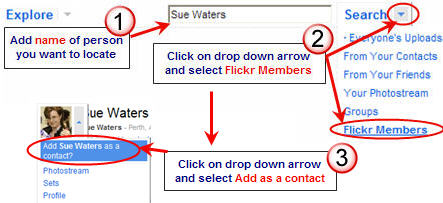
Another great way of connecting with others is joining Flickr Groups. The 2009/365photo, where members share one photo per day for each day of the year, is an example of a group popular with educators.
Using RSS To Manage Your Flickr Account
The easiest way to check out your friends latest photos, monitor recent activities on your photos such as comments and track responses to comments you’ve left on other people’s photos is using RSS.
If you aren’t already using RSS to make your life easier make time to read this information and set up a Google Reader account! This way RSS brings latest updates from your Flickr account automatically into your Google Reader account.
You subscribe to your recent activities as shown in below. Remember to bring up the drop down arrow you hover your mouse over the icon (i.e. hover over You).
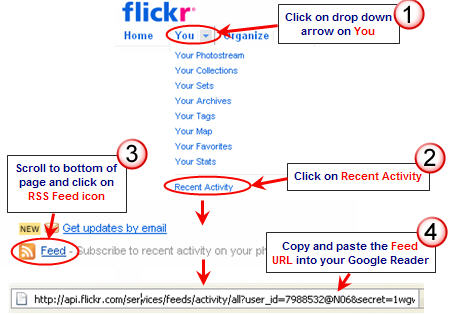
You follow the same process to subscribe to your contacts recent uploads except you click on the drop down arrow on Contacts and select Most Recent Uploads. NOTE: It only displays four uploads per day for each contact.
Organizing Your Photos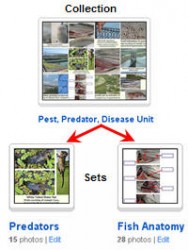

Using Sets and Collections is a great way of organizing your photos to make them easier for both you and your contacts to find.
Sets contain photos while Collections are used for grouping sets or collections together. For example, Pest, Predator, Disease Unit in my Flickr account is a collection which holds sets on aquaculture pest, predators and diseases such as this set of predator photos.
Free Flickr accounts have several restrictions including you can only create 3 sets, 100 MB monthly upload limit (10MB per photo) and views of your photos limited to the 200 most recent images. Paying US$24.95 a year to upgrade to a Pro Account is money well spent to get access to features like unlimited sets, storage and video uploads.
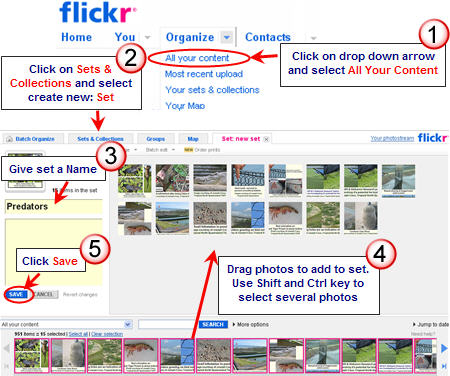
You organise your photos by clicking on the drop down arrow on Organize to create and add photos to sets, organise sets into collections, geotag photos, batch tag photos etc.
FINAL THOUGHTS
Are you convinced of the benefits of Flickr yet? My final post on this Flickr series is about cool stuff you can do with Flickr photos.
If you are enjoying reading this blog, please consider  Subscribing For Free!
I’m also considering creating a pro account for school but due to internet safety relating to children would make the viewing of photos restricted to invite only.
I thought it might be worth mentioning here that Alec Couros has a post on one of the pitfalls of having family photos publicly viewable on Flickr. It is a disturbing post with a really interesting comment thread. Well worth a read.
Yes Claire I was watching on Twitter when he was talking about it. Last year when the business with Al Upton occurred Alec and I had Skype conversations about this actual topic since one of the major issues was the use of student photos.
If you go back to the posts on my personal blog on Al Upton and the Order for Closure you will see how strongly debated it was.
Sue, do Flickr have an educational policy or rates? It would be fine for me to have my own personal Flickr Pro account but I can’t pay for my class. On that vein can a school have one account? I’d love each of my students to have their own folder.
How are other teachers doing this?
Hi Shaun – Here are the terms and conditions for Pro Accounts – Flickr pro is available for individuals aged 13 years or older. If you are 13 or older but under the age of 18, you should review these terms and conditions with your parent or guardian to make sure that you and your parent or guardian understand and agree to these terms and conditions.
Hi Sue – I love your step by step guides on this blog and pick up soooo many useful tips. I was going to ask the same question that Penny asked to put something up about crediting users images from Flickr (so will scroll down and have a look at what your previous advice has been).
Thanks
Kia ora Sue
It’s the clicking twice that I spoke of, once on the centre arrow and then I have to click on the arrow at bottom left. I’d thought that one click on the big arrow would have been enough to get started but no. Is this normal?
Aside all that, Flickr’s good. Another bit of useless information is that Notes are like twitter, but they give you twice as many characters. The limit is 300. But considering what you can do in Notes with links etc, that’s not bad.
Another useless tip is that, when writing a comment in Flickr, you can embed an image with the img src=”URL” tag.
I don’t think most blogs permit this.
Catchya later
Sue, this series is great! I’ve had a Flickr account for a while now, but have never taken the time to really explore it. Thanks for pointing out these great features.
I was wondering how Flickr compares with Picassa, or is that like comparing apples and oranges?
Thanks!
That’s a hard one Claire. Suggest you read some of the comments on the previous post you will see what other readers have said. Definitely Picasa is the best desktop application but you can’t beat the 3rd party applications and social networking for Flickr – that is what makes Flickr the better online tool.
Thanks Sue. The comments in the previous post helped me sort things out a bit.
Hi Sue, some tips on setting copyrights like creative commons automatically or batches would be useful.
Hi Shaun, the best solution would be a plugin. I shall have to ask James nicely.
I discovered today that you can change copyrights in batches. Go to Organize and drag the photos into the main window that you want to batch change. Then from the tab Permissions choose change licensing.
Another discovery; you can set you default creative commons license in your account preferences. I have set mine so all my uploads are automatically: Attribution-NonCommercial-ShareAlike Creative Commons. I believe more people would share their images if they understood how easy it is.
http://www.flickr.com/account/prefs/license/
Thanks for the tip Shaun! I just went in and changed my account preferences.
I’m finding this series really useful. I’d be interested in your thoughts on using people’s photos from creative commons and giving appropriate credit. I feel this is something that teachers should be more aware of in order to pass this on to students.
Good question Penny and I’ve written a very detailed posts on it – scroll to the bottom of this page and refer to the last two posts. Hopefully that helps. When they did the passion quilt meme last year a large number of the edubloggers used images that they shouldn’t.
Hi Sue,
I’ve been a Flickr user for a few years (just the free account) and after reading part one was wondering if it was worthwhile upgrading to a pro account – so, thanks for answering that question.
I’m also considering creating a pro account for school but due to internet safety relating to children would make the viewing of photos restricted to invite only. Do you think that doing so will have too much of an impact on the social-networking aspect?
Thanks, Colin
Hi Colin – The person worth talking to might be John Johnston. He has developed a Flickr Search engine – http://johnjohnston.name/flickrCC/ and a site where he can bring photos together for students – http://johnjohnston.homedns.org/faeflickr/munroes/ .
I think he developed these sites because of concerns for students but it is something you would need to ask him.
To be honest I’ve never had an issue seeing inappropriate images on Flickr but have on Wikimedia Commons. Believe me you don’t want to even think about the images I came across while using the search term bacteria.
I suppose the whole question gets back to why you want to use Flickr and how with your students.
Colin, Definitely worth the 24 bucks! Go Pro…I was constantly finding myself making folders out of the pics that I wanted to upload to flickr as to not go over my 100mb limit. With a pro account that bother is gone!
Hi Sue,
I am fairly new to Edublogger and I must say I am really impressed with the clear and methodical way you explain all the Web 2.0 tools. Your site is a gold mine for educators to expand their skills. Thanks. (Coincidentally I just started a Flickr account and posted yesterday. Now I will link to your site.)
Thanks Paul – glad you like my posts. It is a hard balance of sharing information that helps people starting out with a new online tool while still catering to needs of other readers.
Glad to hear you joined Flickr. Got some cool tricks to show you in the next post.
Kia ora Sue
At the risk of repeating myself 🙂 do you have any tips on how to navigate Flickr? I think Flickr is a great app, but I sometimes find I go round in circles with it when I’m organising things, for a set in a slide-show, say. Somehow, I don’t think it’s just the way I’m holding my mouth.
Also, is it possible to set slide shows so that they start on first click? I find I have to fiddle with the arrow on the left corner to get the things to start displaying – that’s after I’ve clicked the arrow in the centre. Is this normal when they’re embedded into blog posts, or am I going doolally?
Catchya later
from Middle-earth
Hi Ken – with the slide show I think the key is to organise the photos in the set in the order you want them displayed.
Don’t think Flickr slideshows can however there are probably 3 rd party apps that will. There are probably valid reasons why doesn’t play immediately on loading. Normally videos don’t either.
Oops! See my comment at the bottom f the list – duh!
hg