 Have you set up your About page? Or taken the time to review what you’ve written on this page?
NO! Well make this a priority because your About page is extremely important to new readers. It’s where readers find out more about you and your blog. Readers often use it to decide whether to bother subscribing to a blog.
Updating Your About Page
When you set up a new Edublogs blog it automatically comes set up with an about page. Readers access this page by clicking on About in the page links at the top of your theme or in the link in your sidebar.
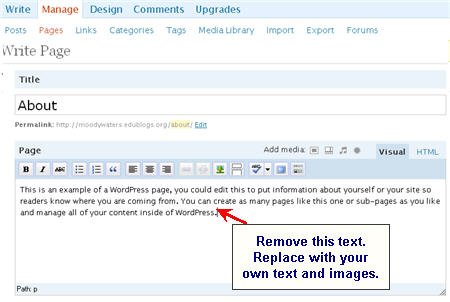
The idea is you change the default text on this about page by inserting your own information.

You do this in your dashboard by clicking on Manage > Pages. Now click on the link to your About page.
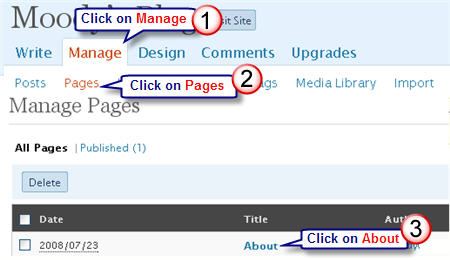
Now it is just a case of replacing the default text on the about page with your own text, images etc.
What To Write On An About Page
Your about page is all about letting people know who are you, what’s your interests and what you write about.
Writing a good ‘About Page’ is hard. Start with telling people more about yourself, people are more likely to engage with your site if they can relate to you as an individual. Then tell them about your blog. Not too long, not too short, include photos that help readers relate to you as a person. Check out how Darren Rowse (Problogger) achieve this.
For class blogs – check out Tips On Writing ‘About Pages’ For Class Blogs!
PLEASE NOTE:
If you are a school student you need to think carefully about:
- What to say or not say – read Miss Wyatt’s post and if in doubt check with your teacher or maybe ask Miss Wyatt!
- Any Photos you use – It’s still possible to include photos that help people relate to you as a person without using your own photo. Check out Meghna’s About page to see how she does this!!!
FINAL THOUGHTS
This post was inspired by the Week 1 task for the Student Blogging Competition because new bloggers often overlook the importance of their About page.
Take the time to review what you’ve written on your about page. Does it clearly highlight to readers:
- Who are you?
- What are your interests?
- What you’re about?
- What you write about?
Why not write a post to ask your readers what they think about your about page? What they like? What changes they’d recommend?
If you are enjoying reading this blog, please consider  Subscribing For Free!
I posted a comment here about 5 months ago. Surprised to see it there (seems so long ago.) Well, in response to a recent post of yours, I’m taking a new look at my About page and have made several changes. I tried to add a pic of myself by inserting it and aligning it to the right but the picture was distorted-very wide. I have found this to be the case with another side aligned picture, of the light bulb. I tried to change the html code but it didn’t take. Images added without text beside them come out fine. Any tips? Maybe it’s my theme at work here.
http://poulingail.edublogs.org/about-mrs-poulin-and-this-blog
Hi Gail, the key with images is to make them a width to works well with your blog. For example if I want it to take up the width of the post I will make it 450 pixels wide (some themes need wider). If I want to wrap text then I normally make the images 200-250 pixels wide – I also make the horizontal and vertical space 5 so the text does not wrap against the image too closely.
how do you add pages?
@ashy1 It is similar to writing a post but instead of clicking on write post you click on write page. Alternatively you can edit the About page the comes with your blog by clicking on Manage > Pages > About page.
To add the links to pages to your blog side bar go into your blog dashboard and go to Design > Widgets and add pages widget to current widget area.
This manual may help you – it has instructions on how to do lots of different things with Edublogs blogs.
Aslan said that they had to prepare for war with the witch.Aslan was telling Peter his plans for attack.Then Peter asked why he was telling him the plans because he thought that Aslan was going to be there.Aslan said he could not promise he was going to be there.That night everone ate silent because Aslan was sad it brung everyone down.Susan and Lucy could not sleep they thought that Aslan was leaving them.They went out and saw Aslan leaveing the camp they followed.After awhile Aslan noticed them.Then Aslan told them to stop he went foreward.Then they saw tons of animals that were on the witchs side and the witch was there to .Then they shaved his mane they shoved him up to the table the witch raised her knife and killed Aslan.Then thy heard tons offeet pounding.They walked to the table and cryed and they saw mice chewing on the ropes.Then they turned around .Then they heard a crack then they turned back tothe table and it was cracked and Aslan was standing in the on the hill.Susan ranup to Aslan and jumped on his back then he ran off.They came to the witchs house and Aslan ran to the stone animals.Aslan ran up to the stone lion and rour towards it the lion slowly came to life.He did the same to the others then they ran into the castle they found Mr.Tumnus and they went off to find the war.They found it and the first thing Aslan did was jump at the witch.The war ended in minutes from when they arrived.Peter,Lucy,Edmund,and Susan all became kings and queens of narnia and Aslan comes and gos from time to time.They were getting older when they found the wardrobe again the professer was waiting outside and said they could not go into the Narnia again through that that wardrobe.
Just trying this —and how it works.
lalalalallala ;llalalala lalalala lalalalalalala lala
@Angela I really loved your comment and realised that we really needed a post on how to write an ‘About Page’ for a class blog so I turned your comment into a blog post. Lots of good ideas are being shared on the post; hopefully these provide some ideas for you?
One challenge I have had is writing an About page for my class blog. I don’t really feel that it should be about me since the blog is representative of my students and how they think. On the other hand, perhaps I should include some things about myself as a teacher and my teaching philosophy.
Does anyone have any thoughts on writing an about page for a CLASS as opposed to an individual (keeping in mind that my students change each year).
Please feel free to check out my about page here and leave a comment with any recommended changes. http://kulikowski.edublogs.org/about/
@meghna Writing a good ‘About Page’ is definitely hard work but as you say a must. Happy to mention your ‘About Page’ — you’ve done an excellent job with it. Hope you get lots of visitors and hopefully they will leave you some nice comments.
@Miss W I agree WOW
@poulingail Thinking you probably replaced your ‘About Page’ with one of your other pages. As you point out your blog is mainly for the family and friends of the students so it really gets back to what information you want to share. The key is to provide them enough details to ensure they understand how to interact with your blog. Off course one idea for the blog posts would be to set up Feedburner email subscription so they could get the latest posts email to them.
Glad you like my posts and am pleased that it helps with your work. My main focus of my work is to know that I’m helping others with what they are trying to achieve.
Perhaps you could help me out? Sarah – a student teacher is trying to work out whether blogging has any place in K-3 schooling. If you have any time can you please drop past her blog and explain how you use your blogs with your students and why?
Hi Sue,
I have recently created a special page called About Mrs. Poulin and This Blog and it lives at the top of the list of Pages. I found it to be a satisfying experience as it now feels more personal to our own class experience and at the same time just shares the info I really want people to know. It also helps people understand that comments are welcome.
I will be happy to drop by Sarah’s blog and set up some communication with her.
Gail
Your new page Gail is looking really good. I notice on the page you talk about weekly newsletters. Since you have a category for them. Are you aware you could create a Feedburner feed for this category and then add an email subscription from Feedburner? This would send out the newsletter as the entire post.
Imagine me now with little clapping hands. I have a new task to work on! Thanks Sue.
(…hmm Feedburner feed for the category hmmm…)
mmm LOL Gail I’m not totally convinced you are clapping your hands – but feel free to ask for help if you need it when creating your feedburner feed 🙂
Thank you Ms. W for the great complements. Glad to know that you liked the blog and About page.
I’m not sure if it’s my theme or if I just edited them out but I don’t have any tabs on top or an About page on my blog at all. poulingail.edublogs.org My main page is somewhat in the About page idea and probably all the info I want to share. This blog is fairly private, intended for the family and friends of my students.
I must say Sue, that you are one of my favorite RSS feeds. I invariably learn something and look forward to applying the new technology whenever possible.
WOW – Meghna – when you joined the student blogging competition, I checked out your blog. What a fantastic example of an About page! I will be using it as an example when I write a reflective post about the competition in a couple of weeks time.
I fully agree with you that an ‘About Page’ is a must for all blogs to connect with the readers and the time taken to develop such a page is worth it.
Thank you for mentioning my About page here. Thanks.