Creating Student Accounts Using One Gmail Account

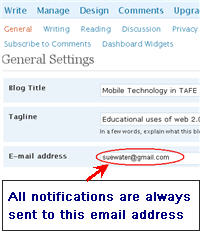
Image of blog email addressWhen you set up blogs with multiple users the comment notifications are only sent to the email address that was used to set up the blog.

So if you’ve set up student blogs with your student’s email address using Edublogs Blog & User Creator feature comment notifications will be sent to your student. This is a problem if you wanted all comments sent to you for moderation.

While you can change the email address in blog settings (Settings > General) a simpler solution is to set up the student blogs using one Gmail account.

Using Gmail To Create Student Accounts

Gmail (or Google Mail) is Google’s free web email service with tons of storage space and lots of great features e.g. ability to easy search mail messages, threaded messages, built in chat.  Create your gmail account here.  I recommend choosing a name that people can identify easily as being you e.g. mine is my name with the s missing from the end of waters.

Educators can use one Gmail account to set up student blogs or sign up for different online services using gmail’s support of plus addressing. How this works is simple! Gmails ignores anything in the first half of an email address after a plus sign so if you create each email with the format username+studentname@gmail.com all emails will be sent to the inbox of username@gmail.com. You can use both text and numbers in the student names.
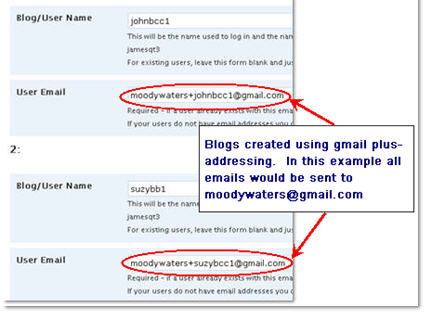
Image of using gmail to create blogs

FINAL THOUGHTS

Remember when using Edublogs Blog & User Creator feature to create student blogs the students are automatically added as Administrators (here is an explanation of the different roles you can assign users).  Also don’t forget to change selection to Yes in the Add Admin field if you wanted to add yourself as co administrator when creating the student blogs.

NOTE: to have access to the Edublogs Blog & User Creator for batch creating 15 blogs at a time you need to be an Edublogs supporter.

If you are enjoying reading this blog, please consider feed-icon32x32 Finding and Adding Creative Commons Images To Your Blog PostsSubscribing For Free!

Bookmark and Share

Edublogs Support Manager @suewaters on Twitter

Tagged with: , ,
Posted in Using Blogs With Students, Working With Web 2.0 Tools
38 comments on “Creating Student Accounts Using One Gmail Account
  1. Art Gelwicks says:

    Question for you Sue…these email addresses are good for a specific class, but have you given any thought about using this as an “address” the student can carry with them from year to year?

  2. Sue Waters says:

    @Art If you wanted students to be able to use the email they would need to create their own gmail or email account because this method wouldn’t work. What you could do is use this to create the accounts and once they are used to using their blogs they could change to their own email address.

  3. Mrs C says:

    This gmail hack has worked brilliantly for me this year at http://56c2008.edublogs.org. It works for some other sites too -I used it last week to get all of my kids onto our pbwiki. All of them can now log on with their own username and password, but I get all the emails notifying changes and they still don’t need their own email address to participate!

  4. uptoncross says:

    Sue I have a problem. I set up 15 student blogs using gmail but the online form didn’t ask for passwords so all the students can access each other’s blogs. When the front page comes up clicking on login takes you straight to the dashboard instead of asking for a password. Is there anyway I can password protect each student’s blog? I am administrator on them all.

    Beverley

  5. maybellesmom says:

    Hello – just setting up my first blog for students to use for September. I set up the gmail account and then tried to add users by adding the +1 to the original

    Example: maybellesmom.edublog+1@gmail.com but when I submit it it says the email does not exist. I also went and changed my email to this gmail account in the settings but still no go. Can anyone help me with what I am doing wrong?

  6. ghadajubai says:

    do your best

  7. classno1 says:

    i have learned manu things.. :P

  8. conlord3 says:

    i like this gmail setup its very cool

  9. Sue Waters says:

    @maybellesmom I think I sent an email to discuss in more detail – please let me know if you need more assistance on this.

  10. beckyferleman says:

    I am trying to invite all my students to use one blog (and not all of them have email) – can I still use this gmail trick?

  11. Sue Waters says:

    @beckyferleman Yes sure. You can choose to use it with all of your students or just some of them — and it definitely still works.

  12. mizzb says:

    I am also trying to use this gmail trick. I have already set up separate class blogs and want to add my students using the one gmail address.

    Just like maybellesmom when I try to set up a new user with the +name@gmail.com it says that email address does not exist. What am I doing wrong?

    Thank you for your help in advance! :)

  13. Sue Waters says:

    @Mizzb I’ve tested both using the Blog & User Creator within the dashboard and the create a user using the Edublogs signup page — am able to create not a problem. Are you using with your gmail account?

  14. inpi says:

    Hi Sue,
    I’m sorry, but I’m having the same issue than @Mizzb and @Maybellesmom.
    As student blogging competition is about to start, I’m trying to add my students as authors to our class blog, at http://inpi.edublogs.org
    I’m doing it using my gmail adress plus + the student’s name@gmail.com. I’m adding these emails where it is written: Add Users.
    But I keep receiving the message that these emails don’t exist!
    (Sue, my computer has been reset, I don’t remember how to enable a spelling corrector in my blog: could you also help me with this?)
    Thank you!
    Ines

  15. Sue Waters says:

    @Ines You need to first set up their username before you can Add them as users. Have you created their username? Have you click on the kitchen sink button? I use FireFox which corrects my spelling for me.

  16. paisie says:

    I added in my 105 students as users. But I bet I should have created their accounts under the “..&blogging” tab. I don’t see any passwords… how do the kids begin?

  17. Sue Waters says:

    @Paisie Did you create your student accounts using the Blog & User creator inside your blog dashboard? Or did you use the sign up page on the main page of Edublogs? The passwords should have been sent in to the email addresses you used to set up for each student.

  18. dirvine says:

    Hello Sue,

    I am trying to follow these directions and gmail keeps telling me that the character: is not allowed to be part of the email address. Can you help?

  19. thesuper7 says:

    Hi Sue,

    I’m trying to set up gmail accounts for my students but I can’t seem to make it work. I created a username for me. Then I try to create a new account and type username+johnny and gmail tells me that only letters, numbers, and periods can be used. Can you help me figure out what I’m doing wrong? Thanks!

    • Sue Waters says:

      @thesuper7, The gmail account you create for yourself is used to set up their accounts on Edublogs. I think you are trying to use the gmail + method to create individual gmail accounts for them — which you can’t do.

      If you want them to each have their own gmail account it needs to be created in their own name.

  20. jonesian1 says:

    Oddly enough, this doesn’t seem to be working anymore. We had several teachers using this method; but now an error message stating that the “email address is not allowed” is showing up in Edublogs. Has WordPress changed something?

    Ian

    • Sue Waters says:

      @Ian, you are using an Edublogs Campus site which works differently than Edublogs.org because you can specify which email domains are allowed to sign up.

      On your site you have it restricted to your district email domain. To allow gmail+ you need to allow gmail.com in your email registrations in Site Admin > Options. I’ve responded in more detail by email.

  21. csweet says:

    I was wondering what Web 2.0 I should definately introduce my students to?

  22. Hi @Sue Waters, I’m having trouble getting threaded (nested) comments to work. I’ve ticked the checkbox ‘Enable threaded…’ in the ‘Discussion’ tab under ‘Settings but I’m not able to activate the Threaded Comments plugin because I’m not an Edublogs Pro user. Is there a way to activate threaded comments without becoming a Pro user?

    I’m using the Ocean Mist theme on the discussion blog I’ve just set up for my students. I did a test comment for threaded comments on the first post, but it doesn’t look like it’s worked.

    • I forgot to add that this is the only post on the Edublogger with the search term ‘threaded’ in it and I can’t find anything in the Edublogs Forum :(

      • Sue Waters says:

        @healthstudies, This new version of WordPress MU that powers Edublogs now supports threaded comments however the theme needs to be designed for that feature.

        So you can only use Settings > Discussion enabled threaded comments option if you are using one of the three Premium themes that support it (we now have more Premium themes but I haven’t checked if they support this feature).

        Other wise you need to use Threaded comments plugin.

        Both the Premium themes and access to plugins are Edublogs Pro features.

        • Thanks! I can now stop trawling through help forums to try and figure out why the little check box didn’t make threaded comment magically appear :)
          Given my class blog is so new, I think I’ll trial the free version for a few months at least and see how it goes before deciding whether to upgrade to Pro.

  23. mrsknights9gs says:

    I tried to set up a “dummy” gmail with the gmail+method today and gmail will not allow it. Just thought I’d let you know. The GMAIL message stated that gmail did not allow any characters other than numbers, letters, and “.”. I just signed up for a blog this week in hopes of using it with my students next fall. I guess I’ll have to find another method for email.

  24. Sue Waters says:

    @mrsknights9gs When you set up your gmail account you don’t use a + when creating the account. For example. say you are setting it up for your class you may create a gmail account called room19@gmaiil.com.

    Once you have created the account you then use this gmail account for signing up for your student accounts in Edublogs. So say for example your student’s name is Brian when you sign up for his account in Edublogs you would use room19+brian@gmail.com and for student John you would sign up for the Edublogs account as room19+john@gmail.com.

  25. mocorrea says:

    “Educators can use one Gmail account to set up student blogs or sign up for different online services using gmail’s support of plus addressing. ”

    I am new at this … so I can use this ONE Gmail account for OTHER web 2.0 resources? not just for Edublogs? like for example wallwisher, glogster, etc?

    Thanks for sharing. I learned a lot from you.

  26. Sue Waters says:

    @mocorrea Definitely. Most online tools will allow you to do this. Best option is to try testing it and see what happens.

  27. art4adults says:

    I have a gmail account but the last part of my address is not @gmail.com instead it is our school’s address. I tried to set up all of my students accounts using the gmail method of +1 and they have been set up but I don’t have any passwords. UGH. The only one that worked was the first one I plugged in. All the rest with the +1(ect) registered but the email was not sent. I received an email telling me they were registered. I do use a separate email for contacting me. Does that make a difference if the 2 emails(my blog and their blog) does not match?

  28. Sue Waters says:

    @art4adults just adding a quick comment here to say we’ve dealt with this one by email so others know it has been sorted out.

  29. birendra says:

    I like intelligent student.
    Capital Bonds

  30. Bots4Free says:

    I found a website called http://www.bots4free.com, it has gmail account creator, youtube account maker and yahoo account creator for free!

  31. Sue,

    What a terrific workaround! Thanks for sharing!

    -Audrey

23 Pings/Trackbacks for "Creating Student Accounts Using One Gmail Account"
  1. [...] Creating Student Accounts Using One Gmail Account | The Edublogger – When you set up blogs with multiple users the comment notifications are only sent to the email address that was used to set up the blog. [...]

  2. [...] and teacher-moderated email accounts, I’d recommend setting them up (for free) through ePals. Sue Waters has written a nice post on how to use a single GMail account to setup student blog emails, but be aware of the COPPA age restrictions in the [...]

  3. [...] can use a single Google Mail to setup student email accounts to use a tool like Animoto, see Sue Water’s post on EduBlogs “Creating Student Accounts Using One Gmail Account” f…. Alternatively, consider setting up FREE and filtered / moderated student email accounts at your [...]

  4. [...] Creating Student Accounts Using One Gmail Account | The Edublogger [...]

  5. [...] Using a free, no-setup-required Gmail alias as an email account as described by Sue Waters in this post for EduBlogs [...]

    [WORDPRESS HASHCASH] The comment’s server IP (75.125.59.2) doesn’t match the comment’s URL host IP () and so is spam.

  6. [...] Hat tip to Sue Waters at the Edublogger [...]

    [WORDPRESS HASHCASH] The comment’s server IP (152.2.70.77) doesn’t match the comment’s URL host IP () and so is spam.

  7. [...] Hat tip to Sue Waters at the Edublogger [...]

    [WORDPRESS HASHCASH] The comment’s server IP (152.2.70.77) doesn’t match the comment’s URL host IP () and so is spam.

  8. [...] Creating Student Accounts Using One Gmail Account – Have you ever wanted your students to make use of a website only to find they need to register with an email address? Sue Waters shows you how you can use your Gmail account to generate as many email addresses as you need. [...]

    [WORDPRESS HASHCASH] The comment’s server IP (67.15.172.5) doesn’t match the comment’s URL host IP () and so is spam.

  9. [...] 9, 2008 Creating Student Accounts Using One Gmail Account | The Edublogger Good directions for creating the Gmail “+” account for your students – in order to sign them up [...]

    [WORDPRESS HASHCASH] The comment’s server IP (72.233.69.35) doesn’t match the comment’s URL host IP () and so is spam.

  10. [...] Creating Student Accounts Using One Gmail Account | The Edublogger – Steps to creating student email accounts using Gmail. [...]

    [WORDPRESS HASHCASH] The comment’s server IP (205.234.248.130) doesn’t match the comment’s URL host IP () and so is spam.

  11. [...] Creating Student Accounts Using One Gmail Account [...]

  12. [...] Create Student Accounts Using one GMail Account [...]

  13. [...] Create Student Accounts Using one GMail Account [...]

  14. [...] TIP: Remember if your students don’t have email addresses you can use Gmail method. [...]

  15. [...] assigned each student a number and the school name acronym DDS (1dds, 2dds, etc)  Then I used the gmail + method described in the hyperlink.  In short you can use multiple user names to create  blogs (each [...]

  16. [...] of their own.  I used the tips found at The Edublogs Community and The Edublogger liberally. The gmail hack for setting up their accounts and the tip to use Google Reader to follow their blogs were great.   Actually the whole series on [...]

  17. [...] tip to Sue Waters at the Edublogger Resources, Uncat elementary, [...]

  18. [...] information was taken from Edublogger which is the support site for Edublogs. Edublogs is a wonderful site where you can create student [...]

  19. [...] Contacts, Calendars : We set up a unique gmail account for each iPad using gmail’s plus addressing syntax (ie smlpsipad+01@gmail.com). We then changed the e-mail signature to “Sent from [...]

  20. [...] to your Gmail userID trick.” See Sue Waters’ February 2009 post, “Creating Student Accounts Using One Gmail Account” for more on how to do [...]

  21. [...] Hat tip to Sue Waters for sharing this Gmail trick back in 2008 in her post, “Creating Student Accounts Using One Gmail Account.” [...]

Leave a Reply

Your email address will not be published. Required fields are marked *

*

You may use these HTML tags and attributes: <a href="" title=""> <abbr title=""> <acronym title=""> <b> <blockquote cite=""> <cite> <code> <del datetime=""> <em> <i> <q cite=""> <strike> <strong>

Welcome!
Here's where you'll catch Sue Waters and Ronnie Burt talking about education and emerging technologies on Edublogs.
Fan us on Facebook
Follow us on Twitter


Find us on Pinterest
Visitor Locations
free counters

Locations of visitors to this page