When you set up an Edublogs blog with multiple users you have the ability to assign and control what other users can do in the blog depending on the tasks you want each user to be responsible for. You need to consider carefully what role you assign other users since Administrators are able to remove other users, including you, and editors can delete content.
The five roles a user can be assigned in decreasing level of responsibility are:
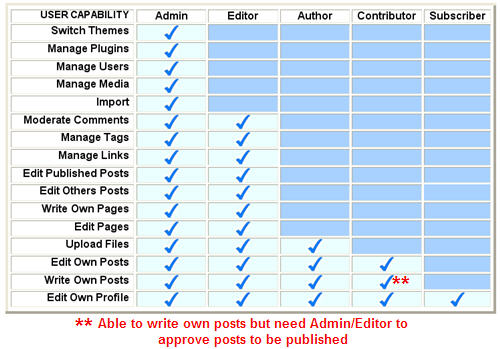
- Administrator – can do everything including complete power over posts, pages, plugins, comments, choice of themes, imports, settings, assign user roles and are even able to delete the blog.
- Editor – is able to publish posts/pages, manage posts/pages, upload files, moderate comments as well as manage other people’s posts/pages.
- Author – can upload files plus write and publish own posts.
- Contributor – can write own posts/pages but can’t publish them.
- Subscriber – can read comments and write comments.
The diagram below summaries the responsibilities of each role:
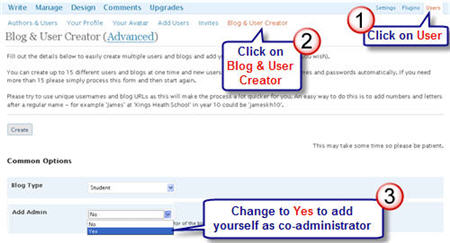
Please note when using Edublogs Blog & User Creator feature:
- Users are automatically added as Administrators.
- To create multiple student blogs you add yourself as co-administrator by changing selection to Yes in the Add Admin field.
To be able to access Edublogs Blog & User Creator Feature you need to be an Edublogs supporter.
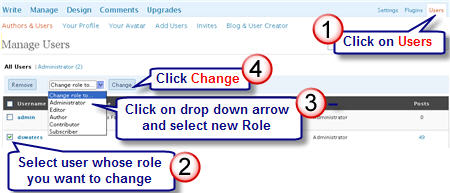
Changing User Role
You change the role of users in your blog dashboard by going to Users > Authors & Users.
FINAL THOUGHTS
Setting up blogs for your students? You may find these posts useful:
- Creating Student Accounts Using One Gmail Account
- Tips On Blogging With Students
- Share Your Advice on Using Student Photos on Blogs
What role(s) do you assign the different users when setting up class and student blogs, and why?
If you are enjoying reading this blog, please consider  Subscribing For Free!
Is there an update to this post? There are now 7 roles available and I’m not sure I completely understand the function and difference for each. For example, I’m set as Teacher, but there is an Administrator option. What’s the difference? Should I change my role?
Hi Carly, you should find our user guide which is regularly updated more helpful. Take a look at this https://help.edublogs.org/what-are-the-different-roles-of-users/
If you have any questions we’d be happy to help. Feel free to email [email protected] so we can chat about the best role option for you.
Hi,
I have been using edublogs with my students for a year now. Last year we had them set as administrators, which was fantastic as though were able to take complete ownership of their blog. We have just realised, however, that this setting will allow them to edit other peoples’ comments, which might have consequences if they change other students comments on their blog – or ours. It seems as though the only option for avoiding this is to go to ‘author’ mode, but that will also involve many other restrictions. Is there any level where students can moderate but not actually edit a comment?
Thanks,
Mollie
@Mollie, unfortunately the ability to moderate comments is linked to the ability to edit them. So you can’t have one without the other.
How do I create an edublog for my students to comment on? How do I post a question for them to answer?
@mcaffrey1970, Have you looked at our Getting Started with Edublogs information? – Located here http://help.edublogs.org/getting-started-with-edublogs/
I do not know what I am doing on this website.
Hello,
I just used the Blog User creator to create Blogs for my Blog Castellano. I don’t see them in my Blog as Users, yet. Does that mean that they have to activate it once they recieve their email and then I can change their status: subscriber, editor, …etc.?
I also noticed that the Dashboard is different than before, would I be able to do the same things?
I also have Blogs that I created last year that I don’t need anymore, Can I delete those?
As you can see I have a few questions,
Thank you,
Susana Bukowski
@Susan The Blog & User creator is designed to create blogs and their usernames. It does immediately create them and the accounts don’t need to be activated by email.
It doesn’t add them as users to your blog. You will need to now add them using Add > Add User (refer to these instructions – http://help.edublogs.org/2009/08/24/adding-users-to-a-blog/ )
To delete the blogs you need to go to Settings > Delete blog, An email will be sent to the email address specified in Setting > General of each blog dashboard. You need to click on the link in the email to complete the process and delete the blog.
Hello Sue,
I made a writing class blog for my students six months ago and have recently asked my colleague teacher to join the blog as an administrator. (so her role is now registered as an administrator.) I’m wondering how I can set the two administrators to receive e-mail notices when our students write comments on our blog. I receive e-mail notices, but my colleague teacher hasn’t received anything yet. Woud you please help me?
Thank you.
Tamiko
@Tamiko, Unfortunately the system is designed so that only one person can receive the email.
Who receives the email can depend on who writes the post. An alternative option would be for you to use a shared Gmail account; that way you could both check the emails in the inbox,
@Sue Waters,
Thank you for your prompt answer and advice. Creating a common Gmail account is a good idea. I’d like to try.
Thanks,
Tamiko
@Tamiko, Glad you liked the idea and once you are used to a shared inbox it is really cool to manage.
Hi Sue,
I was practicing with setting up different types of users on my new class blog missnichols.edublogs.org and I noticed that pending comments can be seen by all users, even those registered as subscribers only. Is there any way to set the pending comments to be visible only to the administrator of the blog?
Under Discussion Settings, I have checked the box that says “An administrator must always approve the comment”, but pending comments are still visible to subscribers.
Thank you for your help,
Susan
@missnichols, Hi Susan, subscribers definitely can’t see those comments because most of the navigation menu isn’t displayed in their dashboard. A subscriber only has Profile, Tools and Stats. They won’t see Page, Post, Comments etc.
You need to log in as a subscriber to see this. Normally I will use a different web browser so that I can have my blog open in two different browsers as different users to compare.