Are you making your life harder or easier? Do you have to visit multiple websites in the morning to catch up on important information or does opening up your browser bring it to you?
Let me show you, as part of our best of Web 2.0 series, how I and others use Personalized Start Pages to bring information to us.
What Are Personalized Start Pages
The idea of a personalised start page (some call them Personalized Homepages) is to bring all the content you consume on a daily basis onto the one page. It’s all about convenience, saving time and providing what you want in one handy location — which you can access on any computer anywhere. They’re called personalized because we can customize our start page to our own personal preferences and needs.
Examples of start pages are iGoogle, NetVibes, PageFlakes and Protopage. They all use two components: feeds and widgets (widgets are mini web applications that you can put onto your website). Please note Pageflakes widgets are called Flakes and iGoogle widgets are known as Gadgets.
The feed component means that you can use the RSS feed from websites such as your favorite blogs to feed their latest posts onto your start page. Widgets lets you run cool applications like email, weather, world clock, to-do lists, sticky notes, bookmarks on your start page.
Popularity of Start Pages
Several in my twitter network choose their start page in their top 3 indispensable Web 2.0 tools — Sue Hickton, John . Curry, Awyatt included iGoogle; Graham Wegner listed Pageflakes and Mike Romard likes NetVibes.
Start pages were included in Top 100 Tools for Learning 2008 list (compiled from the top 10 learning tools by 155 learning professionals) and ranked:
- 15th for iGoogle
- 31st for PageFlakes
- 43rd for NetVibes
- Protopage didn’t make the top 100 list.
Choosing Your Start Page
Each start page has its pros and cons; your choice depends on how you want to use it.
The biggest difference is that NetVibes, PageFlakes and Protopage all provide you the option to create:
- Private pages – only you can view what is on your private pages
- Groups pages – you can share the page with a group of people
- Public public pages – viewable by anyone
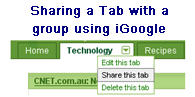
Whereas iGoogle focuses mainly on your personal needs and you can’t create public pages to share content. However you can share tabs with a group using email.
iGoogle is my favourite start page and is my default home in my web browser. My next post will show you why I use iGoogle and how to set up your own iGoogle but in the meantime check out these examples on how the public NetVibes, PageFlakes and Protopage are used:
1. NetVibes
Vicki Davis (Cool Cat Teacher) likes to use NetVibes for checking all her students spaces from a project with one quick look. Here is an example of a NetVibes page Vicki created for educators to promote Advocates for Digital Citizenship, Safety, and Success.
Another example is Crimson Connect which is a student run web portal for Harvard Students.
2. PageFlakes
Technobabble created The Giver PageFlake for her English 7 class who are reading the novel The Giver. While the elearning Guild Annual Gathering 2008 Conference and Expo used the AG08 PageFlake to bring together the content being generated by their conference.
3. ProtoPage
Elearning07 conference protopage is an example of a protopage created for sharing information on a conference program with participants.
FINAL THOUGHTS
Other posts from this Best of Web 2.0 series include:
- Setting Up iGoogle For Your Personal Learning
- Are You Getting The Most Out Of Your Web Browser?
- Getting More Out Of Blogging And Edublogs
- Blogging Tools To Help You Blog
- Using Your Twitter Network For Help & Providing Their Recommendations
Are you using a Start Page? If so, which one and why? We would love to check out examples of start pages used with students. If you have any examples, can you please share?
If you are enjoying reading this blog, please consider  Subscribing For Free!
Hello,
It’s 2013 now but I am still using a personal start page. I recently switched to Yourls.com, because of its simplicity and simple interface.
It doesn’t allow you to put weather, news, stock information boxes on the site, but I don’t really need that.
It does allow you to create 1 simple personal start page with your favorite links.
I am a teacher, and I’m considering using a start page for my classes. What do you think about adding Facebook on the page, allowing students access during class?
@noriko, My personal instinct says that unfortunately Facebook is a really controversial topic and that there are Districts and States that ban the use of teachers using it.
However this might be an interesting question to ask other educators. I’m happy to write a post to ask others to share their thoughts on the use of Facebook, Let me know if you want me to do this.
Thanks Sheryl – I’ve just added your link to my post on using iGoogle so that people can check out other examples of Start Pages.
Sorry about the URL for Mr. Bakins (yes, I also spelled his name wrong) ESL class. Try this one:
http://74.205.69.104/barry.bakin/12217248
Mainly I use Pageflakes, but I like to keep up with Protopage. I think Protopage would be an excellent resource for elementary teachers and any students who want their own start page. My teen likes the puppy on Protopage;D
Thankyou Sue
I really appreciate the way you do this round up. I meant to say thankyou on the other thread about Jing too.
It does work on my Firefox and Safari so perhaps those add ons are the culprit.
@Grace Thanks for sharing your PageFlake — its good for people to be able to check out the different ways that people use Personalised Start pages so that they can decide which one suits them best for their purpose. Wonder if the loading speed relates to which widgets you have added? Shame they are blocking NetVibes.
@Mike I love how you have set up your public NetVibes page so that you explain what each section is about. Great idea. I did have problems with it loading in FireFox which maybe to do with one of the add-ons I have since it loaded fine in IE. Hope they find the Edublogger helpful.
@Vicki Is NetVibes your preferred Start Page for PLN with students? What do you prefer about NetVibes over the others?
@n2teachingonline Interesting how you use all the different Start pages. Would love to check out the Mr Baskin’s PageFlake, currently the link you supplied takes me to PageFlake homepage.
Yes, I am often amazed at myself for missing an obvious use of media, while using media well. I use Pageflakes, Protopage and Netvibes, in that order, to keep up with my network.
I appreciate your posting about using these start pages for our own work.
When I first registered with Pageflakes, I found Mr. Barkin’s class start page. I think it is a great model for other teachers. Here is the URL: http://www.pageflakes.com/default.aspx
Thanks for the posting.
I use personal pages for many different tasks and teach the students to create a PLN (personal learning network) for their major topics — so they’ll have one for the term paper topic, one for each of my projects, one for class, etc. That way they have a “launch point” for any task they are beginning. IT is one of the most useful skills that one can teach students and most importantly, keeps them focused and saves time!
I created a public page to explain the idea of netvibes for an inset session. Also contains a selected group of EDU Blogs which includes yours.
http://www.netvibes.com/titian#Introduction
Hi Sue, personalised start pages are fun to use and a good way to introduce web2 tools to new users.
Pageflakes and netvibes are quite similar and I noticed that when I tried out netvibes and igoogle the pages load more quickly than they do in Pageflakes.
As Ann mentioned, I also have different tabs to organise different flakes but mine are on pageflakes as netvibes is blocked in our school.
The interface is such that I can easily keep an eye on new posts and comments on the class and (new) student blogs. Very handy.
Grace Kat http://www.pageflakes.com/3gkat2008/22683077
@Odysen Support – Unfortunately your web page isn’t loading for me to check out so will have to look later. There was a slight problem with the link to your blog so I’ve edited it.
@Michele There is definitely an aspect of what we are used to and comfortable with. Lots of people have changed from del.icio.us to Diigo but I’m okay with del.icio.us. Is your Social Media 101 NetVibes page public? And if so can you share the link so we can see how you have used it?
@Awyatt I also tried to use iGoogle with my students unfortunately there seems to be an issue on our student network which interfers with how gmail works. Which one are you using for organising your personal information – iGoogle or protopage? I assume you are adding different information to the different start pages.
@Alix Definitely feeling a bit jealous of you listening to David Warlick 🙁 . I remember getting into a discussion with him on his blog about literacy and digital literacies skills — he is not in favour of the term digital literacies and from memory says it should be just part of all literacies we teach. Thanks for telling you have been blogging about iGoogle I’ve gone across and checked your posts plus links. I’ve bookmarked them to refer to when I write my next post. I use my iGoogle page for my personal learning but due to issues at work haven’t used it as well as I would like with students. It was good to read how others are using it with their students.
@Readerdiane Can you tell me a bit more about how you are using the iGoogle page with your students? Also love to hear how you go using Google Documents collaboratively with your students.
@Ann (Your Librarian) Sorry I have to laugh. When we had our last Challenge, the 31 Days to Build a Better Blog, Michele Martin and I got into a bit of a NetVibes vs Google Reader competition (war). So its good to know in the Comment Challenge we now have NetVibes vs iGoogle. I went across and checked your blog before I realised you had left the link. I think in our last Challenge Alex Miller even created a screencast of NetVibes? I should have thought to add it to this post.
Perhaps Michele this time we should create a vote to see how popular each one is?
I adore my Netvibes! Love, love, love it. And now it’s starting to catch on to the students here at ASB. They see my start-up page when I run a workshop with them or work on my computer with them, and they want it too. I’ve recently posted a little ad on my blog for netvibes: http://dearlibrarian.edublogs.org/2008/05/12/how-can-i-get-a-netvibes-page/
I especially like how you can personalize the page but also organize your start-up page with tabbed pages. One tab is for my application widgets, another for my rss’d blogs, another for favorite links…It’s a great tool and one for all to start using!
Ann
Personally I like Bloglines as my reader but I have set up an iGoogle page. I had my teachers set up an iGoogle page and will do the same with my 7th graders. We are just starting with Google documents this week. I want to spend time on the collaborative part first.
I’m glad you are blogging on the idea of personalized start pages. I too have been blogging and presenting on this topic lately. There is a confluence of several powerful ideas lately which are personal learning environments (PLE), professional learning communities (PLC), self-directed learning, and personalized start pages. I see a major shift in the concept of professional development; away from the three-hour workshop and towards the self-directed “What do I want to know?” The experts are no longer standing at the front of staff development seminars; the experts are now bloggers who are farther down the road then we are and eager to share their insights.
I just spent a morning yesterday listening to David Warlick speak about teaching media literacy and not just technology skills. Knowing how to pull important media to us is what personalized start pages are all about. It’s customized staff development on demand.
-Alix E. Peshette
i agree. the critical thought is still, as for all history, what is behind it all.
I use both protopage and igoogle. And each one links to the other! Each service has different widgets and tools, so I can’t decide between them. I began introducing igoogle to my students a year ago (mostly because of the entire suite of google apps being available with a single login) and they seem to like it.
I know I said I’d switched to i-Google and Google Reader, Sue, but I ended up back with my Netvibes. I could never get used to the Google Reader interface and I also have liked the ability to create some public pages to share as part of trainings. For example, I did a recent training on “Social Media 101 for PR professionals” and set up a netvibes page for them with all PR-related feeds and widgets. They loved it!
Regardless of which one people use, though, I think a personalized portal is really critical to getting a handle on the flow of information. Otherwise, it’s just craziness!
Don’t forget Odysen.
Odysen has similar to above with the widgets and multiple pages including multiple page options such as private, shared, and public, but also includes these other noteworthy advantages:
Free-formatting widgets. Why restrict your widget to three columns when you can make them to whatever size you feel is the most appropriate for the content, key for maps, nine day weather forecast, large news feeds, all widgets and their content are unique, match the formatting to the content.
Integrated news feeds. To save space, integrate as many feeds as you want into one widget, it’s your page, don’t waste space.
Share Todo lists with specific members or groups, bringing the shared capability down to the widget level. This allows you to have a Todo list on one of your private pages, but at the same time to share it with others.
Lots more info and page examples on the blog at Odysen Blog.